MacBook Water Damage Dubai? Here’s What to Do Immediately
Can I turn on my MacBook after water damage?
Or should I wait?
That’s the panic question almost every laptop owner asks.
One second you’re sipping coffee ☕, the next you’re watching it drip into your keyboard. And you think: ‘Maybe it’s fine if I just power it on?’
📌Here’s the truth—turning it on too soon can damage your logic board. You need the quick expert MacBook repair Dubai team who can save your device and your data.
In this blog, we’ll step into concepts regarding what to do immediately after water damage, how the right repair services can help you, the MacBook Pro liquid damage cost Dubai, and when replacement makes sense.
If you’ve just spilled water—or wanted a quick solution—this guide is written for you.
What To Do Immediately After MacBook Water Damage Dubai
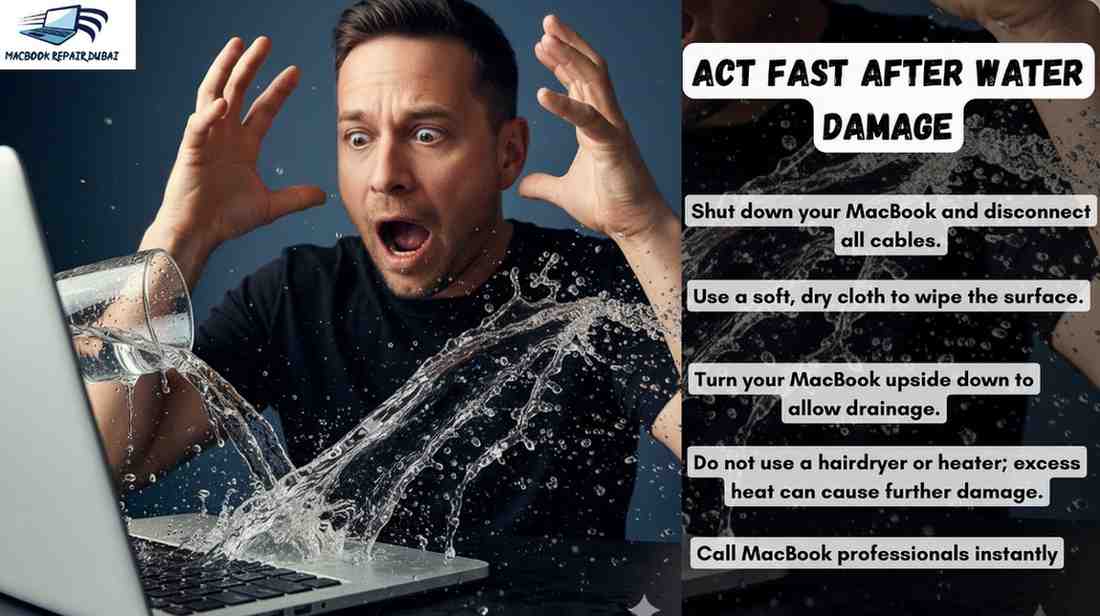
—: Do not power on your MacBook
Never ever think of turning on the Mac after you spill some liquid by mistake. This is the first mistake most people make after a spill.
Generally, users press the power button to “check” if the MacBook is still alive— أو ميت.
This often causes a short circuit on the logic board.
📌 One client at our MacBook Repair Dubai center brought a Mac device that could have been saved with just simple cleaning, but powering it on 🔛 immediately burned the logic board completely.
👉 DON’Tpress the power button or attempt to restart your MacBook after a spill. Make sure you resist the urge to test it.
—: Disconnect charger & external devices
If your MacBook is charging when the spill happens, unplug it immediately.
Why? Because electricity and water together can destroy components instantly.
This condition is the same for any connected hard drives or USB devices.
📌 We once had a MacBook Air that survived a coffee spill, but the external SSD connected at that moment was completely destroyed.
👉 DON’T leave your charger or any accessories connected when liquid is present. Disconnect the power to reduce the chain damage risk. Get an emergency MacBook repair Dubai from experts now.
—: Turn your MacBook upside down to let the liquid drain
Gravity can be your 💪 partner in crime. Place your MacBook upside down in a tent position (⋀) so that water doesn’t pool under the keyboard.
📌 One of our clients in Dubai shared how this trick saved their MacBook Air from total damage until MacBook Air repair services in Dubai professionally cleaned it.
👉 DON’Tshake your MacBook up & down. Place it flat; otherwise, the liquid will spread inside.
—: Wipe surfaces gently—avoid heat dryers
Make sure you wipe only with a lint-free cloth. A common mistake most users make is that they use a hair dryer to soak up the water. You shouldn’t do it because hot air pushes liquid deeper into the logic board and can damage sensitive components.
📌 One of our engineers recalls a MacBook Pro case where the owner used a hair dryer, but unfortunately, it melted keyboard adhesives, and to fix it, he had to pay double the cost.
👉 DON’T use hair dryers or heaters to dry your MacBook. You can do gentle surface cleaning & call the professionals at +971585309989.
—: Know when to seek professional help
If liquid has reached the keyboard or screen edges, your DIY won’t help you fix it. Call professionals who use ultrasonic cleaning to remove corrosion before it spreads
Wondering, “What should I do immediately if I spill water on my MacBook?”—the safest answer is always: get it checked by MacBook Repair Dubai experts within 24 hours.
👉 DON’Tdelay seeking help, even if your MacBook looks fine at first. It can save you from expensive replacements. Get an emergency MacBook repair Dubai from experts now.
—: Remove SIM or expansion cards if present
While most MacBooks don’t have SIM slots, some owners use expansion kits in SD or USB-C ports.
Remove these quickly, as liquid trapped inside can damage both the card as well as the slot.
👉 DON’Tleave any SD cards or USB-C plugs inside while drying. It’s a small but often overlooked detail.
—: Watch for “silent” damage signs later
Even if you successfully dry your MacBook and turn it on later, corrosion can build up quietly over weeks.
📌Dubai users report sudden screen flickers or shutdowns months after the spill.
Professional services at a MacBook Repair Dubai workshop right after the spill can definitely help avoid this hidden ticking time bomb, which you are surely unable to notice as an amateur.
👉 DON’Tassume your MacBook is safe just because it works after drying. Corrosion is playing its secret duty inside your device. Call experts at +971585309989 to fix it now.
MacBook Water-Damage Repair Costs (Complete Cost Overview)
Water spills on a MacBook can be costly. Apple-authorized centers (Apple Stores or Sharaf DG/iStyle service centers) use genuine parts and AppleCare+ covers spills with a flat incident fee (~AED 1,149).
Without AppleCare, repairs often involve logic-board replacement or a new unit (typically AED 1,500–3,000 for a MacBook’s logic board). The repairs usually take 3–7 days, according to parts availability.
On the other hand, third-party shops in Dubai offer cheaper water-damage fixes. Many provide free diagnostics and quick service (often same-day).
Some simple liquid-damage cleanups will cost you only 250–750 AED, but some component-level fixes can cost roughly 300–800 AED.
If you need to replace your complete logic board, then third-party shops typically charge from 800 to 2,000+ AED. It depends on the Mac model as well. Get an emergency MacBook repair Dubai from experts now.
AppleCare Water Damage UAE— Warranty & Coverage Limitations
Does AppleCare cover water damage on MacBooks in the UAE? Many MacBook owners in Dubai often ask this common question, just like you are wondering… So the answer is a “BIG NOO” under the standard warranty.
Apple’s basic warranty does not include accidental damage, which means liquid spills or rain exposure are excluded.
Repairs for water damage under warranty are automatically considered out-of-warranty cases, which can be expensive.
Meanwhile, AppleCare+ does expand coverage to accidental damage, but even then, water damage is not fully covered at no cost.
Instead, AppleCare+ asks users to pay a service fee (around AED 1,149 per incident) for liquid-related repairs. Get an emergency MacBook repair Dubai from experts now.
Wrap-Up Section
Water damage is one of the most stressful issues most MacBook owners face. Your one quick action can save you money & your device.
Apple’s standard warranty does not cover liquid spills, and even with AppleCare+, you’ll still face service fees for accidental damage.
That’s why many users turn to trusted & certified MacBook Repair Dubai experts for faster and affordable solutions.
Don’t wait or try DIY hacks like rice bags or hairdryers. Call licensed experts now at +971585309989 for your MacBook—and your wallet.

.png)